
Exclusive IPD distributor for the Czech and Slovak RepublicsOriginal components · CAD/CAM libraries · technical support+420 604 483 343obchod@exklusiv-dent.cz
SCAN · DESIGN · RESTORATIVE TECH & LITE libraries Innovation Catalogue 2026 Clinic + laboratory

IPD digital workflow

From an accurate scan to predictable CAD/CAM work

Where does this page sit in the complete chain?IPD Solutions Map · clinic ↔ laboratory

The scanning component, library, design, prosthetic component and 3D model must all speak the same geometric language.

IPD connects the stages of scanning, digital design and prosthetic manufacturing. The result is not one isolated product but a verifiable continuity from implant position through CAD data to the final seating of the restoration.

IPD Dental Group Barcelona IPD Innovations 2026 Technical support for the Czech and Slovak Republics
SCANscanbody · scan transfer · ScanLogiQ
DATA & LIBRARIESvalidation · TECH · LITE · platform
DESIGNindication · indexing · angulation · emergence
RESTORATIVETi-bases · Multi-Unit · PSD · ipdMilled
MODEL & VERIFICATIONdigital analog · ModelPro · seating

Accuracy of input data

Correct matching of the scan body, platform and library reduces the opportunity for error from the very start of the design process.

Continuity between clinic and laboratory

The hand-off is more than an STL file. Information about the implant, scan body, indication and intended component matters as well.

Flexibility of the manufacturing route

The workflow can continue through a Ti-base, Multi-Unit, custom ipdMilled abutment or digitally supported attachment system.

Two design routes

TECH for accuracy, LITE for optimisation

The IPD Innovation Catalogue distinguishes two library routes. This is not a ranking of “better” and “worse”; it is about correct matching to the scanning component used and the objective of the workflow.

TECH LIBRARIES

Accuracy-focused route

TECH libraries are designed around IPD scanning solutions such as the Scan Abutment or Scan Transfer. They allow the geometry and parameters prepared for IPD digital solutions to be used throughout the workflow.

  • verify the specific IPD scan body and its indexing type,
  • use the corresponding TECH library and platform,
  • confirm the intended component and indication,
  • restart the CAD software after updating the library.
Explore TECH libraries
LITE LIBRARIES

Optimisation-focused route

LITE libraries allow workflows based on OEM or supported third-party scan bodies. The selected library must nevertheless match the exact scan body, platform and component.

  • identify the manufacturer and exact scan-body reference,
  • do not assign a LITE library based only on a similar implant-system name,
  • verify the correct branch for Model Creator as well,
  • if anything is inconsistent, compare seating against the TECH workflow.
Explore LITE libraries
Practical rule: the library is not selected from the implant alone. The scan body, scanning level, platform, restoration type and component actually used in the final restoration all matter.

Data hand-off

What must travel from the clinic to the laboratory

An STL file is only one layer of information. Without precise system identification, a geometrically attractive scan can be linked to the wrong library.

Minimum data package

Implant manufacturer and model · platform · scan body and reference · implant / Multi-Unit level · indication · indexing · intended component · CAD system and library used.

Clinic: clinical identification and scanning

Verify seating, system, platform, scanning level and completeness of the scanned areas.

Hand-off: STL + technical data

Include the information that allows the laboratory to assign the correct library without guessing.

Laboratory: library and design intent

Select the TECH/LITE branch, required component and restoration parameters before design begins.

Verification: model, seating and screw

Before finishing, verify contacts, passive fit, screw access and the correct fixation element.

Checklist

Before the laboratory clicks “Design”

System and platform

Not only the implant brand, but the exact model and platform.

Reference scanbody

IPD, OEM or third-party scan body, and crown / bridge variant.

Current library

Correct package, correct folder and restart of the CAD software.

Prosthetic level

Implant level, SRA or Multi-Unit level must not be confused.

Final component

Ti-base, direct interface, premill, attachment or another workflow branch.

Screw and instrument

Verify the reference, screwdriver and prescribed tightening torque for the specific system.

3D model & verification

ModelPro and digital analogs close the verification loop

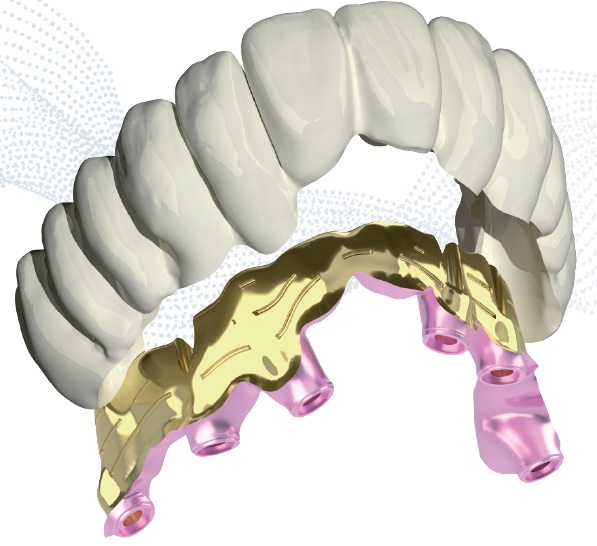
Within its workflow, IPD recommends ModelPro for 3D models. A correctly designed model with the appropriate digital analog helps bring the virtual design back into a physical verification step.

ModelPro for creating 3D models in the IPD digital workflow

FAQ

Frequently asked questions about the digital workflow

What does the IPD digital workflow mean?

It is the continuity between the scanning component, input data, correct CAD library, design, selected prosthetic component, manufacturing and verification on a 3D model. Each step must use matching geometric and platform logic.

What is the difference between TECH and LITE libraries?

IPD presents TECH as an accuracy-focused route using IPD scanning solutions and LITE as an optimisation-focused route using OEM or supported third-party scan bodies. The specific library is always selected according to the scan body, platform and component used.

Is ScanLogiQ part of the IPD workflow?

Yes. ScanLogiQ extends data acquisition and validation in full-arch restorations. It leads from the intraoral scan to a validated STL file ready for downstream CAD/CAM software.

Is a 3D model always required?

It depends on the indication and protocol. IPD recommends ModelPro for 3D models. A model with digital analogs allows physical verification of position, contacts and seating before the restoration is completed.

How do I verify the correct library and compatibility?

Prepare the implant manufacturer, model, platform, scan-body reference, selected component and CAD system. Exklusiv Dent technical support can use these details to identify the corresponding library branch.

Technical support for the Czech and Slovak Republics

Not sure about the scan body, library or component?

Send us the implant reference, a photograph of the scan body used and information about the intended restoration. We will help establish the correct route before an error reaches manufacturing.

New from IPD USA

Three new practical articles on digital continuity

We did not translate the original US materials mechanically. We adapted them to a technical context, added related pages and separated practically useful principles from marketing language.

New interactive guide

Full-arch scanning: MUA, Scan Transfer and ScanLogiQ

This practical page connects clinical steps, data verification, ScanLogiQ/AssistLogiQ and passive-fit verification in extensive implant cases.

Open the guide

Libraries and version management

IPD CAD/CAM libraries are available free of charge

IPD libraries connect the scan body, platform and target component. Current packages are provided free of charge and, for version control, we send the download link on request.

exocad DentalCAD 3Shape Dental System Dental Wings PIC dental Renishaw Blender for Dental

Availability of a specific CAD system and library branch may vary by implant, platform, scan body and intended component.

e-dent logo

I am a dental professional within the meaning of Section 2a of Czech Act No. 40/1995 Coll., on advertising regulation. I confirm that I am authorised to access content intended for professionals.