
Readable geometry
Advanced geometry helps capture orientation and position in both intraoral and laboratory scans.
Accuracy · seating · reliability
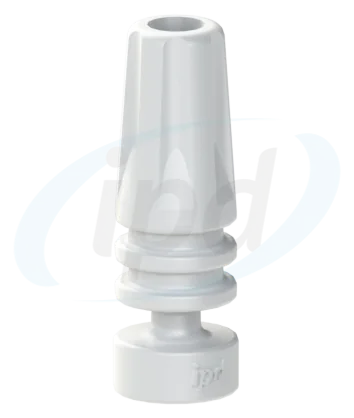
A scan body is the digital coordinate reference for an implant, analog or abutment. Its geometry must exactly match the library used.
The IPD Scan Abutment streamlines intraoral and laboratory scanning and helps capture implant position for subsequent prosthetic design and manufacturing. The portfolio includes solutions for single crowns and multi-unit restorations and integrates with IPD CAD libraries.

Why the scan body is critical
CAD software cannot see the implant directly. It derives position and orientation from the scan body and its library geometry. An error in this pair can propagate through the entire prosthetic restoration.
Advanced geometry helps capture orientation and position in both intraoral and laboratory scans.
The scanned geometry is matched in CAD software to the corresponding platform and library branch.
The portfolio includes variants for single crowns and multi-unit frameworks.
The solution is designed for major intraoral and desktop scanning systems on the market.
Selection by level and indication
The term scan body covers several different protocols. The decisive factors are the prosthetic level, restoration type and library used for design.
Digital recording of a specific implant connection and its orientation. Verify the manufacturer, model, platform and scan-body reference.
Choose by brand →
AB-SR-00/01, AB-SR-11 Scan Transfer, the TECH/LITE library, direct-to-MUA Exocad workflow and a verification prototype in one connected sequence.
MUA fixation → scan → CAD → verification →Position is recorded above the Multi-Unit abutments. For full-arch cases, specialised transfers and a validation protocol may be appropriate.
Multi-unit workflow →
A scan body can also transfer the position of an analog in a working model. The laboratory must preserve the same reference and library geometry used in the design.
Complete digital workflow →Crown versus bridge
The Innovation Catalogue lists solutions for both single crowns and multi-unit frameworks. A specific scan body therefore cannot be selected from the platform alone.
| Indication | What is transferred | What to verify | Downstream route |
|---|---|---|---|
| Single crown Single crown design | Position and orientation of one implant or abutment. | Platform, indexing, scan-body height and the corresponding library. | CAD/CAM Ti-bases → |
| Multi-unit restoration Multiple framework design | Relative position of multiple implants or abutments. | Bridge variant, indexing, matching library branch and passive-fit verification. | Design workflow → |
| Full-arch at Multi-Unit level All-on-X | Position of the Multi-Unit platform and, depending on the protocol, the anatomy of the alveolar ridge. | Transfer type, ScanLogiQ or another validation protocol, and the correct prosthetic seating interface. | Scan Transfer for MUA → |
CAD library
Correct scan-body-to-library matching is more important than the name of the CAD system itself. Both routes can be accurate when they correspond to the scanning component actually used.
TECH libraries connect to the IPD Scan Abutment or Scan Transfer. The design uses geometry prepared for the specific IPD reference, platform and intended component.
LITE libraries support optimised workflows with selected original or third-party scan bodies. The exact product and recommended library must be verified, not just the implant brand.
Related professional pages
The scan body is the beginning of the digital branch, not the end. Accurate results require validation, the correct library, the intended component and final verification.
Six steps from data acquisition through CAD design to the verification model.

A guided protocol for extensive restorations and preparation of a validated STL.

Direct interface or Ti-base for multi-unit and full-arch restorations.

Scan bodies, libraries, Multi-Unit AP and other connected digital solutions.
Pre-scan check
Not only the brand, but the exact implant line.
Diameter or designation of the prosthetic platform.
Implant, Multi-Unit abutment or analog in the model.
Manufacturer, REF and, where applicable, crown or bridge variant.
TECH, LITE, library version and CAD software.
Crown, bridge, full-arch and planned interface type.
Frequently asked questions
Technical support for the Czech and Slovak Republics
Send the implant manufacturer, model, platform, a photograph or REF of the scan body, restoration type and CAD software used. We will help determine the correct combination.
See the sequence from the milled bar through digital recording of the retention sites to the model with PS-AR-00 analogs.
New interactive guide
This practical page connects clinical steps, data verification, ScanLogiQ/AssistLogiQ and passive-fit verification in extensive implant cases.
Important information for use
A scan body is a precision component. Before intraoral scanning it must be processed according to the current instructions for use and must not be deformed by excessive tightening torque.

I am a dental professional within the meaning of Section 2a of Czech Act No. 40/1995 Coll., on advertising regulation. I confirm that I am authorised to access content intended for professionals.